Preflight
The preflight safety gate — every check family, blocking vs acknowledged warnings, and how to resolve findings.
Preflight is CueForge’s automated safety gate. It runs automatically when you enter Show Mode and checks the show for problems that software can detect — missing media, broken targets, output risks — before an audience ever sees them.
Blocking errors vs warnings
| Severity | Meaning | Your options |
|---|---|---|
| Error | The show would fail or behave dangerously. | Blocking — you cannot enter Show Mode until fixed. |
| Warning | Something is unusual or unimplemented but may be fine for your show. | Acknowledge and proceed. Acknowledgement applies to this session and the current warning conditions. |
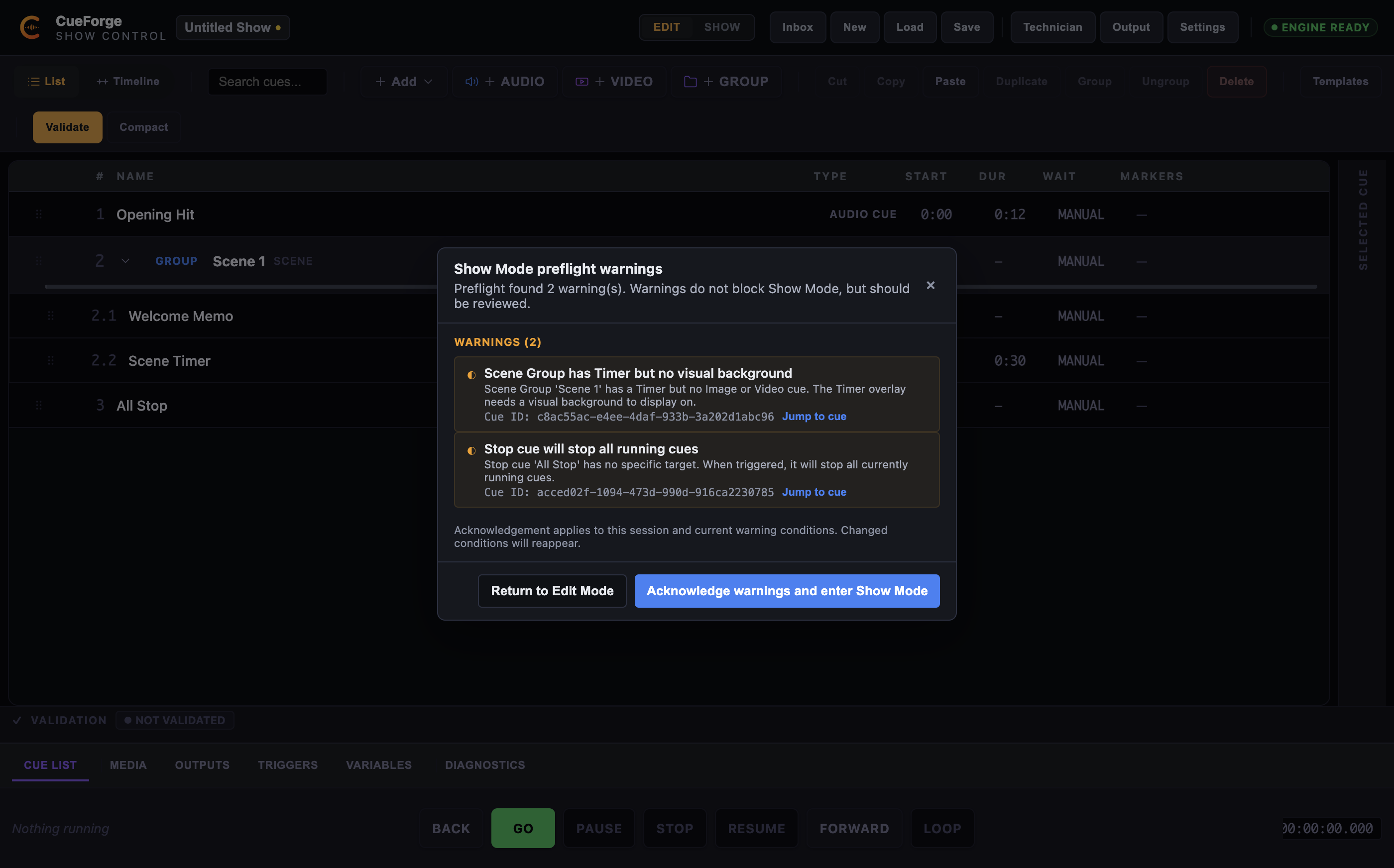
The modal title reflects the outcome: “Show Mode preflight failed” (errors present) or a warnings variant. It has Blocking Errors and Warnings sections, each item with a Jump to cue shortcut, and the buttons Return to Edit Mode, Enter Show Mode, and Acknowledge warnings and enter Show Mode.
Only acknowledge a warning if you understand why it appeared and have confirmed it does not affect your show. Never acknowledge warnings blindly — the acknowledgement applies to this session and the current warning conditions; change the show and preflight re-evaluates.
The preflight modal on entry to Show Mode, showing two real warnings with Jump to Cue: a Scene group timer without a visual background, and a Stop cue with no target.
What preflight checks
Preflight covers these families in the 0.99.1 beta:
- Project and structure — an empty project; hierarchy problems; empty groups.
- Media — audio, video, and image cues with an empty path or a missing file.
- Routing — Preview route (aliases Master); audio bus assignments that are missing or unknown; route None (no audible output).
- Timing — looping audio or video with auto-advance; indefinite images with auto-advance; zero-duration waits.
- Video — no output target; invalid or unsupported dissolve takes; video audio preview-alias notes.
- External sends — OSC, MIDI, and HTTP cue output validation.
- Call and Stop — missing or invalid call targets; stop cues with no target (stop-all), which warns because of its broad effect.
- Scene and timer — scene-group visuals; timer overlay configuration.
- Memos — empty critical memos; memos that require acknowledgement.
- Variables and flow — variable issues; wait-until, jumps, and circular jumps.
- Audio buses — channel maps, missing assigned devices, collisions.
- Multichannel — routing configurations that do not cover the available channels (no silent downmix).
- Geometry — invalid visual geometry.
- Outputs and mapping — disabled or missing output targets; missing outputs; invalid projection quads.
- External control — the
external_control.*families: feedback-loop risk, source conflicts, and listener states (MIDI/OSC/HTTP disabled or in error). - LTC and timecode — external input readiness, lock/rate and configured policies. Live LTC and MTC input are implemented; external reception does not automatically enable cue firing.
Check incoming status with Timecode Triggers off, then deliberately arm only the intended rehearsal. See Timecode.
Resolving findings
Each item offers Jump to cue, which selects the offending cue in Edit Mode so you can fix it directly. Typical fixes:
- Missing media — relink or replace the file (see Projects, Saving and Recovery), then re-run preflight.
- Video dissolve not supported — switch the Take Type to Cut; timed Dissolve is authored but not implemented at runtime.
- Looping cue with auto-advance — set continuation to Manual, or accept the warning if the chain is intentional.
- Listener disabled — enable the MIDI/OSC/HTTP listener in Settings → Triggers & Control.
- Missing output or binding — open Settings → Outputs & Displays and bind the display (the Outputs tool window links there too).
Pre-show workflow
- Make final edits in Edit Mode.
- Save explicitly (
Cmd+S). - Switch the header mode switch to SHOW — preflight runs automatically.
- Fix every red error (Jump to cue is fastest).
- Read every yellow warning; acknowledge only what you understand.
- Enter Show Mode.
Before doors
- Preflight passes with zero blocking errors.
- Every warning has been read and consciously acknowledged or fixed.
- Media files are on fast local storage.
- Output windows are on the correct displays (no Missing bindings).
- A backup copy of the project file exists.